Updating a Static Site With AI and Your Voice
I spoke into my microphone. A few seconds later, a complete blog post appeared on my static website. No CMS login. No markdown editor. No deploy pipeline to babysit. Just a voice prompt, an AI agent, and a git commit.
Here is the tweet that started it all:
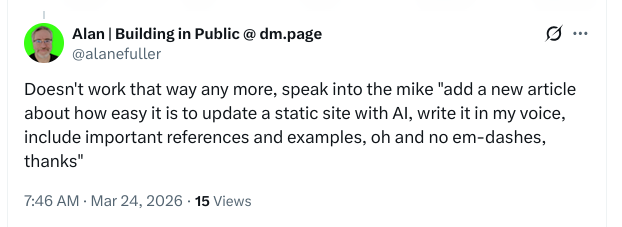
The Prompt I Gave
I was using Claude Code in my terminal, which accepts voice input through my microphone. The prompt I actually spoke was roughly this:
“Use this screenshot, create some content based on that image and use that image in my static site as a blog post. Explain both this prompt in detail and the prompt that you’re working from and how you did it, as well as the content, in different sections. Tell them what the technology is.”
That is it. No file paths. No template references. No CSS classes. The AI agent figured out the structure of my site, read the existing pages and components, matched the styling conventions, created the page, copied the image into the right directory, and wired up the navigation. All from a single spoken sentence.
The speech-to-text transcription was not perfect. It added some artefacts (the word “sand” appeared a few times where pauses occurred). But the AI understood the intent and filtered those out.
The System Prompt Behind the Scenes
Claude Code does not just receive my voice prompt in isolation. It operates within a context that includes:
- A project-level CLAUDE.md file that describes the tech stack (Astro, Tailwind CSS, Docker/Nginx), the component structure, key features like email obfuscation and image optimization, and the essential commands for building and deploying.
- A global CLAUDE.md file with my personal preferences, telling the agent to always check the local project instructions first.
- Tool access to read files, write files, search the codebase, run shell commands, and use specialized sub-agents for exploration.
- Git awareness so it knows the current branch, recent commits, and repository state.
- A memory system that persists information across conversations, so the agent learns my preferences over time.
This means the AI already knew this was an Astro site with Tailwind CSS, that pages live in src/pages/, that components like Header and Footer exist, and that the styling follows specific conventions. It did not need me to explain any of that.
How the AI Actually Did It
Here is the step-by-step process the AI followed:
- Read the image to understand the tweet content and context.
- Explored the codebase by reading the layout, existing pages, components, and public directory structure.
- Analysed the writing style from the About page to match my voice: short paragraphs, direct language, practical focus.
- Copied the screenshot into
public/images/so it could be served as a static asset. - Created the blog post as a page, importing the same Header, Footer, and Layout used by every other page.
- Added a Blog link to the site navigation in the Header component.
- Built the site to verify everything compiled without errors.
The entire process, from voice prompt to finished page, took under a minute.
Interestingly, the AI initially created the post as a standalone Astro page. It did not know that the remote repository already had a content collection blog system set up. When I pushed and pulled the remote changes, it discovered the existing blog infrastructure and converted the post to use it properly. That is part of the process too: the AI adapts when it encounters new information.
The Technology
Several technologies came together to make this work:
Claude Code (the AI Agent)
Claude Code is Anthropic’s agentic coding tool. It runs in your terminal and has direct access to your filesystem, shell, and development tools. Unlike a chatbot that just suggests code snippets, Claude Code actually reads your project, writes files, runs commands, and makes changes. It is powered by Claude, Anthropic’s large language model.
Astro (the Static Site Framework)
Astro is a modern web framework for content-driven websites. It generates static HTML at build time, which means the site loads fast and costs almost nothing to host. Pages are written as .astro components that combine HTML templating with a frontmatter script section. Content collections let you write blog posts in markdown with typed frontmatter schemas. This site uses Astro 5.x.
Tailwind CSS (the Styling)
Tailwind CSS provides utility classes directly in the HTML markup. Instead of writing separate CSS files, you apply styles like text-gray-700 and mb-4 inline. This makes it straightforward for an AI agent to match existing styling patterns by reading the markup of other pages.
Speech-to-Text Input
The voice input uses the system’s built-in speech recognition. The transcribed text goes straight into Claude Code’s terminal prompt. It is not a separate product or integration. You just talk, and the words appear as a prompt.
Why This Matters for Small Businesses
I have spent years building tools for small businesses. The biggest barrier I see is not the technology itself. It is the friction of using it. Content management systems require logins, dashboards, formatting tools, and media uploaders. Even static site generators traditionally need you to know markdown, git, and the command line.
This approach removes almost all of that friction. You describe what you want in plain English (or speak it aloud), and the AI handles everything else: the file structure, the markup, the styling, the image placement, and the navigation updates.
It is not perfect. You still need to review what the AI produces. You still need a development environment set up. But the gap between “I have an idea for a blog post” and “it is live on my website” just got a lot smaller.
Try It Yourself
If you want to experiment with this workflow:
- Install Claude Code from Anthropic.
- Open your project directory in the terminal.
- Add a
CLAUDE.mdfile describing your project structure and conventions. - Start talking. Or typing. Either works.
The CLAUDE.md file is the key. It gives the AI the context it needs to make sensible decisions about your project. Without it, the agent can still read your code and figure things out, but with it, the results are more consistent and more aligned with your preferences.